All posts by David McLachlan

How to Find and Hire the BEST Project Managers

Do you know how to pick and hire the BEST Project Managers?

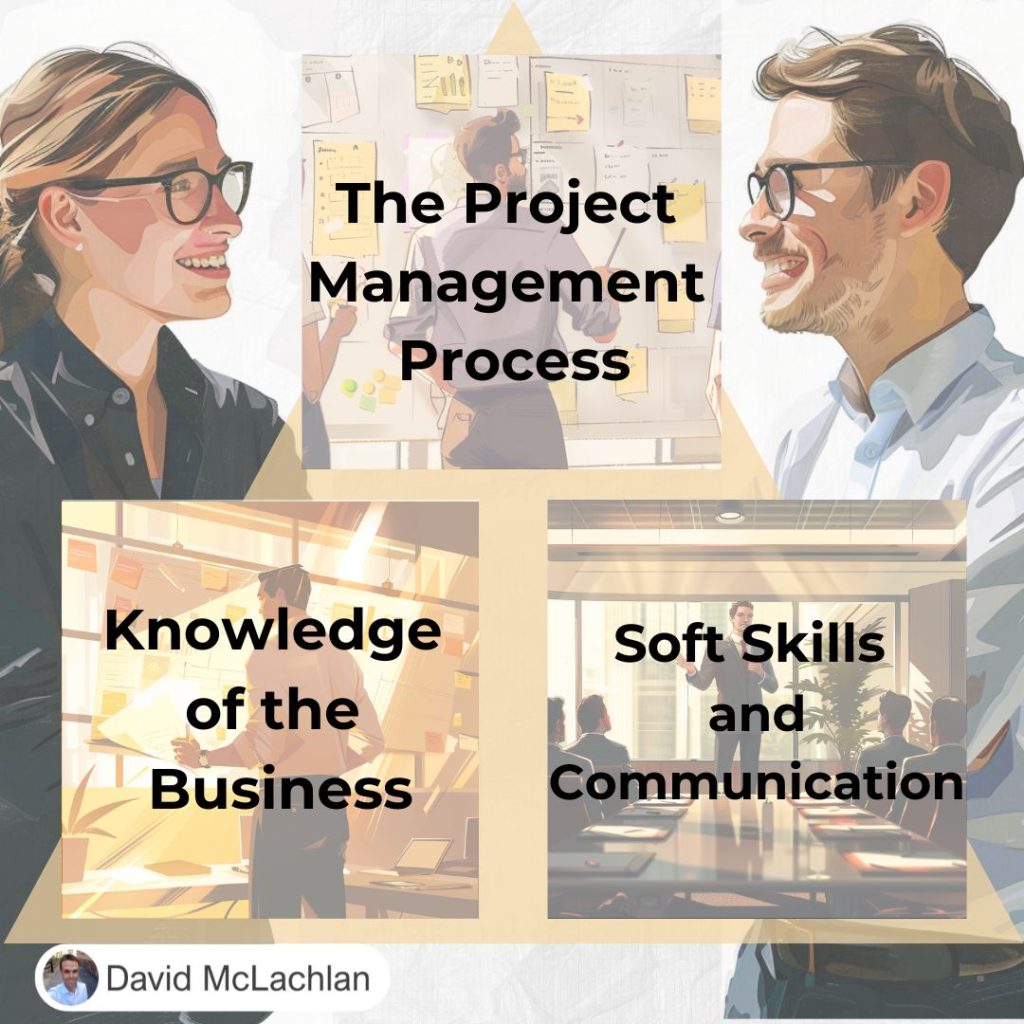
Here are the three skills all the best Project Managers and Leaders have:

➡️ The Project Management Process

🏆 Knowing the right steps to take is so, so important. Find your Stakeholders, write or approve a Project Charter, then Plan Requirements, Scope, Schedule, Cost, Quality, etc. Miss a step and it could spell disaster. Know them all and win. The good news is you can learn the PM Process if you need to.

➡️ Knowledge of the Business

🏆 Having industry, system or business process knowledge will make things easier for you when managing change. You can sense-check decisions, costs, team-members, or vendors. You can help your team solve problems. The good news? There are ways to map out Business Knowledge if you’re starting from scratch.

➡️ People and Communication Skills

🏆 Knowing the first two is no good if you leave a trail of chaos in your wake. Know how to bring the best out of people. Know how to communicate effectively, how to influence and negotiate without being creepy. Know yourself, and know the arena you’re playing in. The good news is you can learn these skills too.

Use these three skills together to find the best Project Managers and win.

See more Project Management Picture Concepts: 

You can see what people are saying about David McLachlan here: REVIEWS

Navigate to Free Project Management and Leadership Articles through the links on the right (or at the bottom if on Mobile) 

PMI PMP 35 PDUs CourseThe Ultimate PMP Project Management Prep Course (35 PDUs)
Agile Certified Practitioner (PMI-ACP 21 PDUs)The Complete Agile Course: PMI-ACP (21 PDUs), Coaching, Jira and MORE! 
50 Project Management Templates Gantt Chart Risk Matrix and more Excel50+ Project Management Templates in Excel and PowerPoint (Gantt Chart, Risk Matrix and more!)
Project Management Plan TemplatesPre-made Project Management Plan Template: Save 100 HOURS!


How to Count Colored Cells in Excel (3 Ways)

Excel doesn’t have a formula to count colored cells, so here are three fantastic, easy ways to count colored cells in Excel.

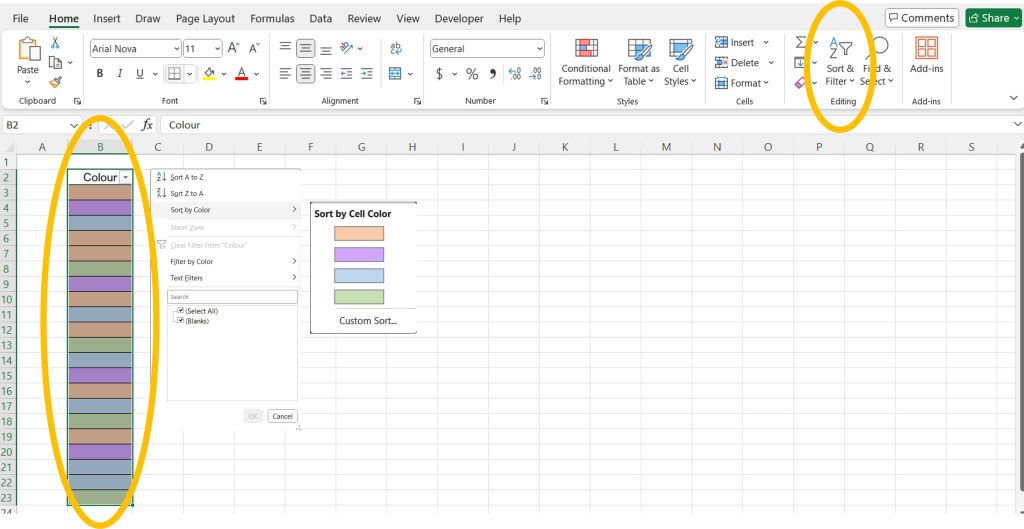
Way 1: Using a Filter

  1. Select the range of colors with the header cell included
  2. Go to Home > Sort & Filter > Add Filter
  3. Click on the down-arrow in the header cell, Sort by Color, and select the color you want.

Now you can count the sorted cells and see how many of that color there are.

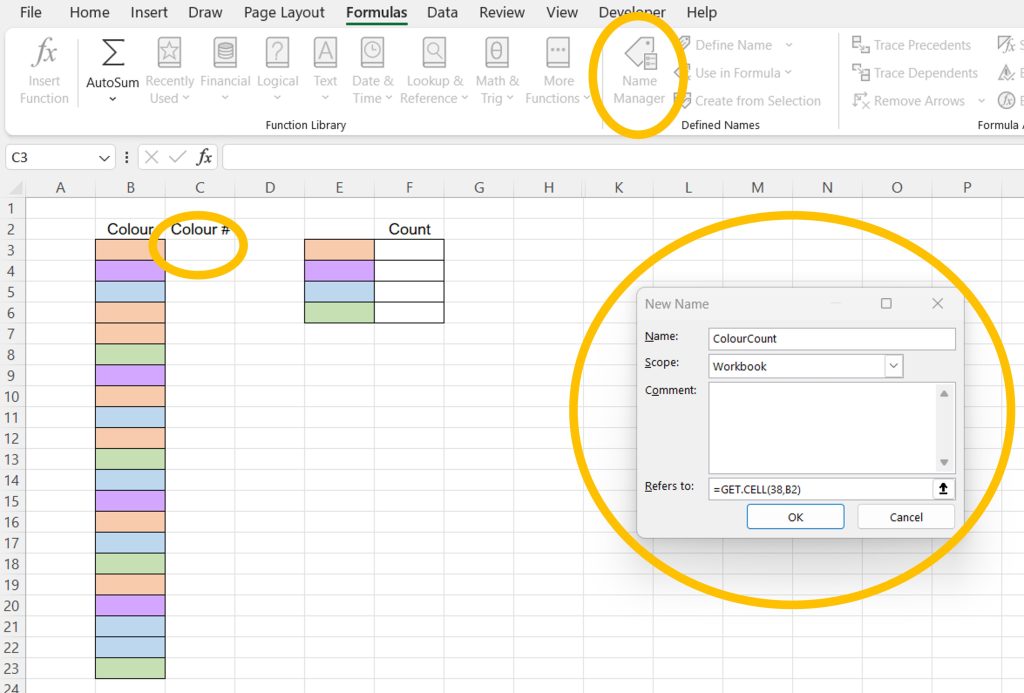
Way 2: Using Name Manager

This way is more powerful, faster, but a bit more complicated.

  1. Select the cell NEXT TO the range you want to count color in (in this picture it’s C3)
  2. Go to Formulas > Name Manager > New Name
  3. Input the new name (something like ColorCount, but it’s your choice)
  4. Input the formula: =GET.CELL(38, B3)
    • (“38” checks the cell color attribute)
  5. Now in the cell next to your colored column, input your new formula: “=ColorCount” and drag it down the column. It will give you the “Numbers” that associate with the colors in the cell next to it.
  6. Now in a separate cell with the color you want to count next to it (E and F columns in the picture), input “=COUNTIF(E3, ColorCount)”
    • Where E3 is the color you want to count, and ColorCount is our Named formula from before.

This will count ALL the colors that match that color!

Way 3: Creating a Formula to Count Color Using VBA

The final, coolest, fastest and most automatic way is to create our very own Formula in Excel that does exactly what we need. We’ll do this using VBA, and you can see how easy it is to create your own formulas!

  1. Select Developer > Visual Basic
  2. In the VBA Window, Select Insert > Module
  3. In the Module window that appears, input the below VBA code, then close the window (it saves automatically).
  4. Finally, use your new formula in any cell: =COUNTINGCOLORS( Range of Colors, Cell with the color you want to count)

The code is:

Function COUNTINGCOLORS(MYRANGE As RANGE, MYCOLOR As RANGE)

Dim COLORCELL As Integer
Dim CURRENTCOUNT As Integer

COLORCELL = MYCOLOR.Interior.ColorIndex

Set CELL = MYRANGE

For Each CELL In MYRANGE
If CELL.Interior.ColorIndex = COLORCELL Then
CURRENTCOUNT = CURRENTCOUNT + 1
End If

Next CELL
COUNTINGCOLORS = CURRENTCOUNT

End Function

See more Excel Tips and Tricks: 

You can see what people are saying about David McLachlan here: REVIEWS

Navigate to Free Project Management and Leadership Articles through the links on the right (or at the bottom if on Mobile) 

PMI PMP 35 PDUs CourseThe Ultimate PMP Project Management Prep Course (35 PDUs)
Agile Certified Practitioner (PMI-ACP 21 PDUs)The Complete Agile Course: PMI-ACP (21 PDUs), Coaching, Jira and MORE! 
50 Project Management Templates Gantt Chart Risk Matrix and more Excel50+ Project Management Templates in Excel and PowerPoint (Gantt Chart, Risk Matrix and more!)
Project Management Plan TemplatesPre-made Project Management Plan Template: Save 100 HOURS!


Leadership versus Management – You Need BOTH

Should You Be A Leader or a Manager?

Many people say you should focus on being a Leader, instead of a boss or a Manager. But when you look at the definitions for each you will begin to realize that you need both Leadership and Management in your skillset in order to get things done.

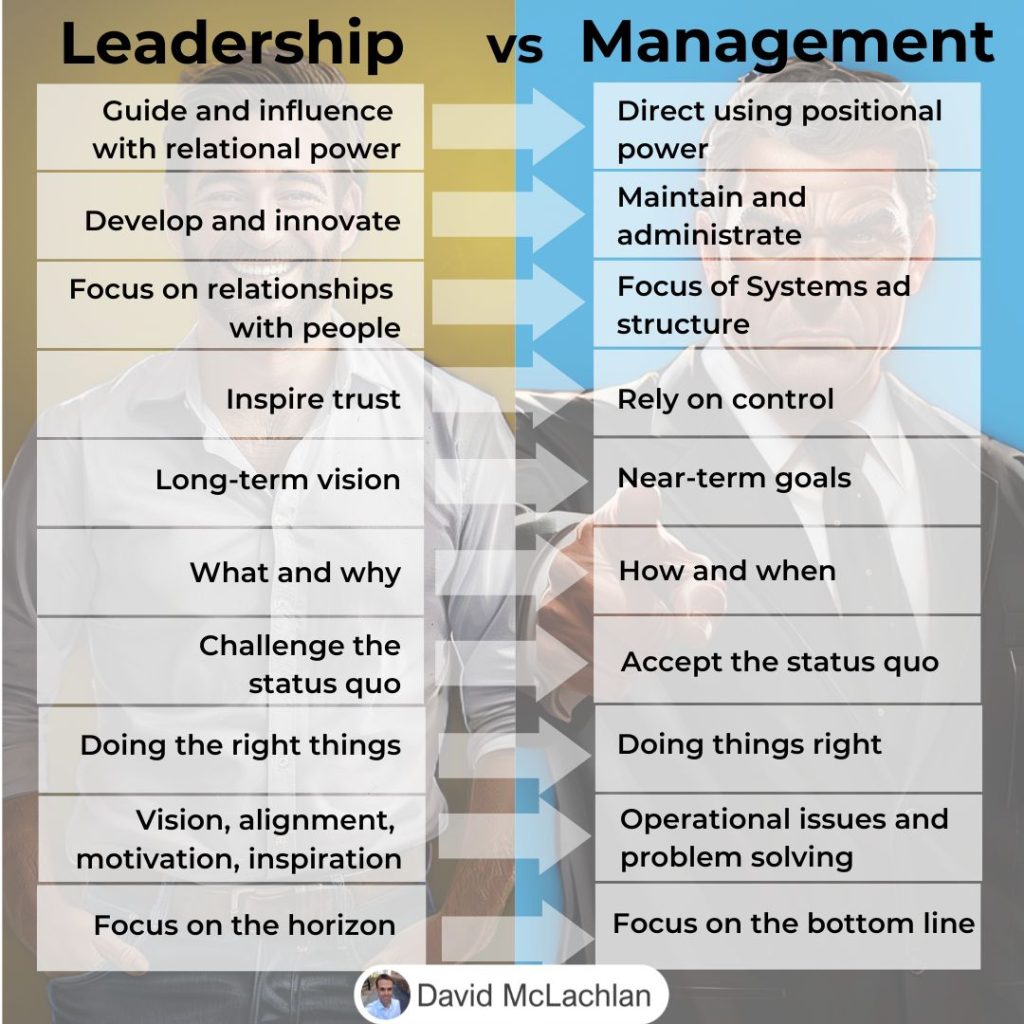
What a Leader Does

A Leader will focus on people and improvement with things like:

  • ✅ Inspiring trust in their people
  • ✅ Looking at the Long-term vision
  • ✅ The WHY behind what the team is doing
  • ✅ Ensuring their team are focusing on the right things to get where they want to go
  • ✅ Challenging the status quo in order to improve and innovate

What a Manager Does

Meanwhile, a Manager will focus on the numbers, administration and getting things done, such as:

  • ☑️ Using Directive leadership and their Positional Power to get things done quickly
  • ☑️ Maintaining the way things are and administrating the day-to-day work
  • ☑️ Focusing on near-term goals for the team to achieve
  • ☑️ Looking at How and When things will be achieved
  • ☑️ Doing things the right way
  • ☑️ Operational issues and problem solving
  • ☑️ Focusing on the bottom line

By combining both the skills of a leader and a manager, you will keep your team engaged and find success in working towards the right goals for your business and project.

See more Project Management Picture Concepts: 

You can see what people are saying about David McLachlan here: REVIEWS

Navigate to Free Project Management and Leadership Articles through the links on the right (or at the bottom if on Mobile) 
PMI PMP 35 PDUs CourseThe Ultimate PMP Project Management Prep Course (35 PDUs)
Agile Certified Practitioner (PMI-ACP 21 PDUs)The Complete Agile Course: PMI-ACP (21 PDUs), Coaching, Jira and MORE! 
50 Project Management Templates Gantt Chart Risk Matrix and more Excel50+ Project Management Templates in Excel and PowerPoint (Gantt Chart, Risk Matrix and more!)
Project Management Plan TemplatesPre-made Project Management Plan Template: Save 100 HOURS!


What Is A WBS Dictionary?

Breaking Down The Work

A typical Work Breakdown Structure “decomposes” items, or breaks them down from a high level feature or deliverable, into smaller Work Packages or User Stories that a person can work on.

But once you’ve decomposed those deliverables, you need to add information to them to make them meaningful. And you do that with a WBS Dictionary.

What Goes In A WBS Dictionary?

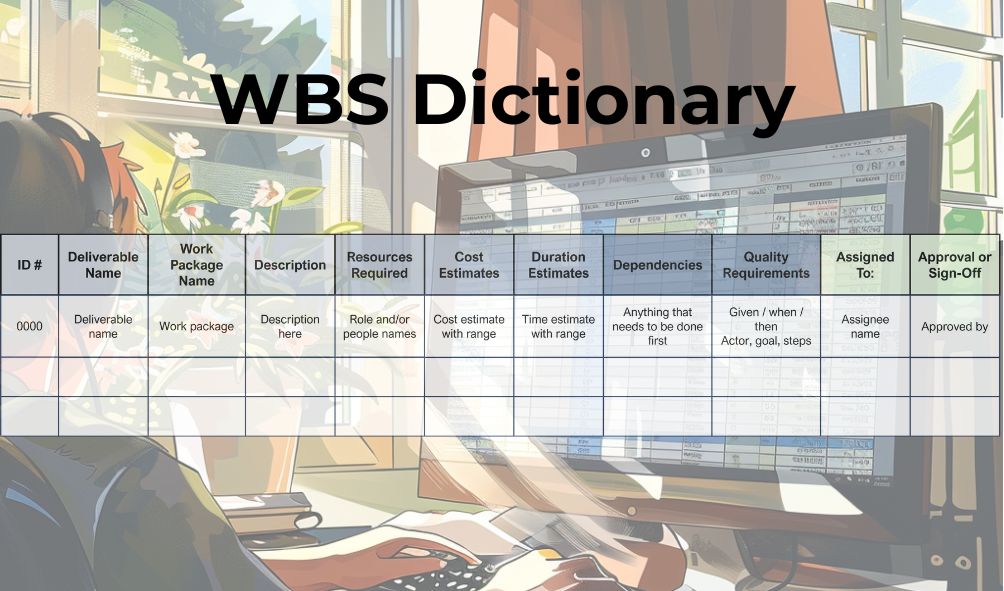
A WBS Dictionary lists our deliverables, the work packages in those deliverables, and then any additional project information we need. It will usually include:

  • A Unique ID
  • Deliverable Name
  • Work Package Name
  • Description

And then Project attributes, such as:

  • Resources Required
  • Cost Estimates
  • Duration Estimates
  • Dependencies (what needs to be completed first)
  • Quality Requirements (tasks or acceptance criteria)

And lastly, the people involved, such as:

  • Who the item is assigned to
  • Who approved or signed off on the item.

Having all this information at a glance makes it easier to understand your project and see what is needed.

See more Project Management Picture Concepts: 

You can see what people are saying about David McLachlan here: REVIEWS

Navigate to Free Project Management and Leadership Articles through the links on the right (or at the bottom if on Mobile) 
PMI PMP 35 PDUs CourseThe Ultimate PMP Project Management Prep Course (35 PDUs)
Agile Certified Practitioner (PMI-ACP 21 PDUs)The Complete Agile Course: PMI-ACP (21 PDUs), Coaching, Jira and MORE! 
50 Project Management Templates Gantt Chart Risk Matrix and more Excel50+ Project Management Templates in Excel and PowerPoint (Gantt Chart, Risk Matrix and more!)
Project Management Plan TemplatesPre-made Project Management Plan Template: Save 100 HOURS!


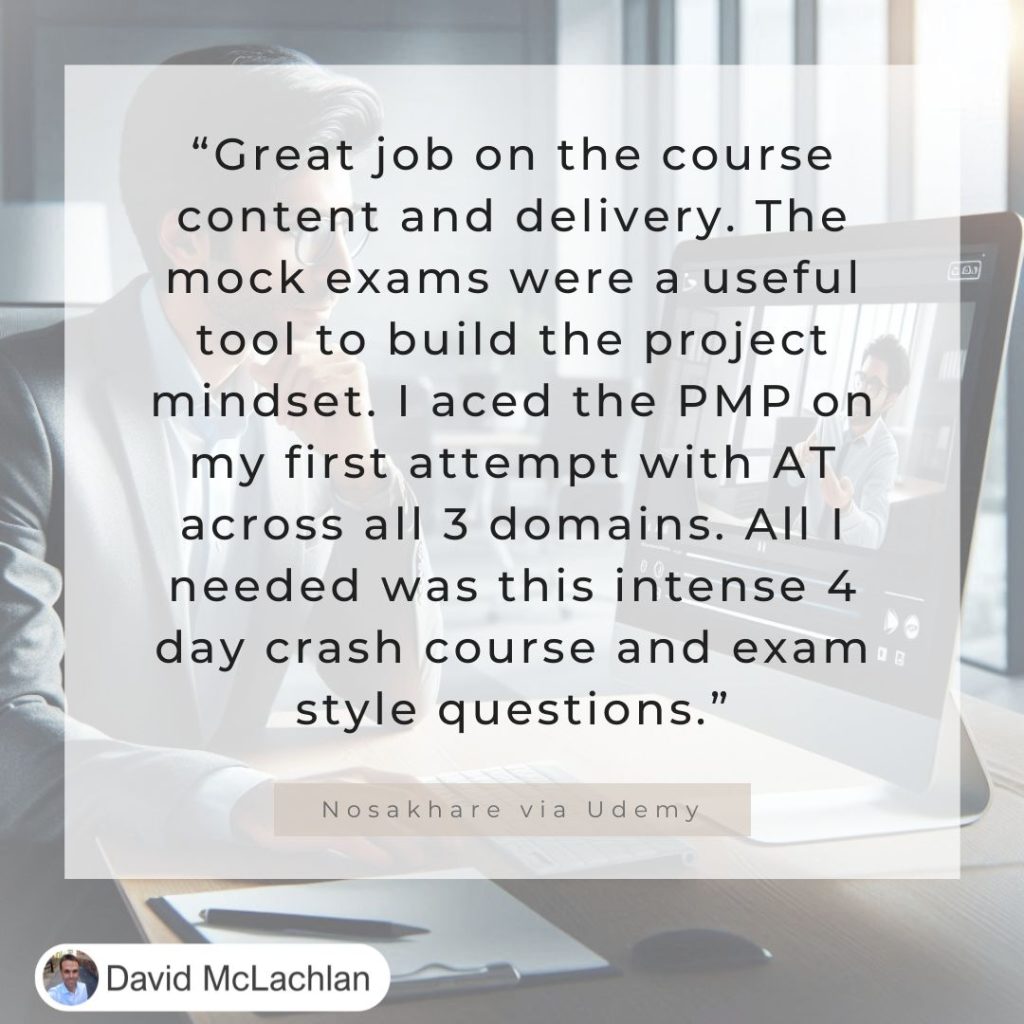
David McLachlan Review – “I aced the PMP on my first attempt with AT across all 3 domains.”

“Great job on the course content and delivery. The mock exams were useful to build the project mindset. I aces the PMP on my first attempt with AT across all domains. All I needed was this intense 4 day crash course and exam style questions.” – Nosakhare – PMP Course on Udemy.

No matter where you’re starting from, you can improve your life.

No matter how small it starts, each small improvement you make will build on the previous one, getting bigger and bigger like a snowball rolling down a hill. Make the right choices.

Choose the study instead of television. Choose your family instead of social media. Learn something new every day. This is another person passing their PMP – it is wonderful to hear 😊 And YOU can do it too!

See live comments and reviews on David McLachlan on YouTube, Udemy and Etsy.

See what people are raving about! Get the Project Plans, Project Tools in Excel, Udemy PMP Course or Udemy Agile course here:

PMI PMP 35 PDUs CourseThe Ultimate PMP Project Management Prep Course (35 PDUs)
Agile Certified Practitioner (PMI-ACP 21 PDUs)The Complete Agile Course: PMI-ACP (21 PDUs), Coaching, Jira and MORE! 
50 Project Management Templates Gantt Chart Risk Matrix and more Excel50+ Project Management Templates in Excel and PowerPoint (Gantt Chart, Risk Matrix and more!)
Project Management Plan TemplatesPre-made Project Management PLAN Template: Save 100 HOURS!


How The Cost of Quality Increases On Your Project

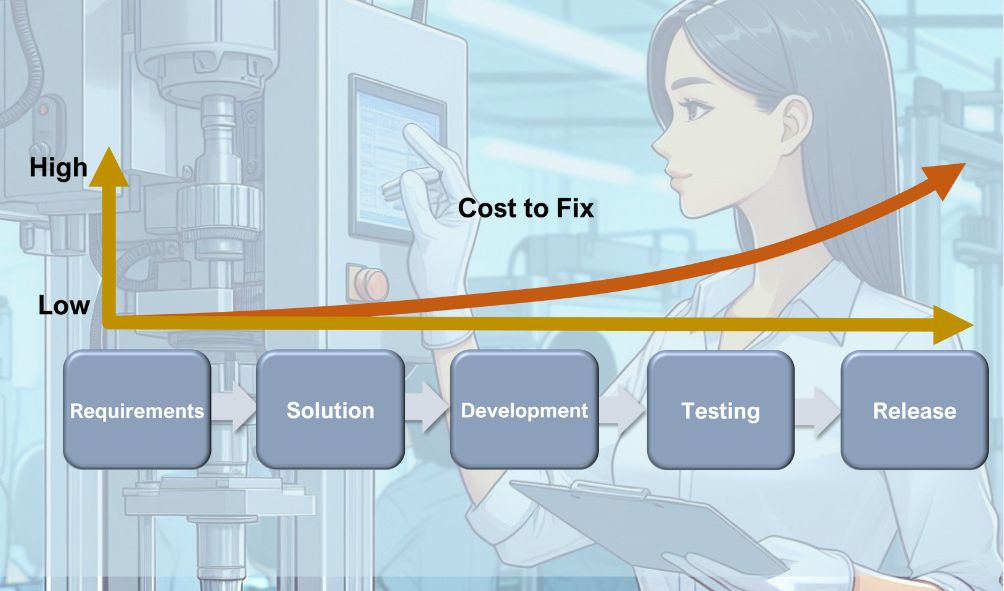
The cost to fix a defect increases as it gets closer to the Customer.

🤝 During Requirements: It costs very little to check, prototype and review requirements before we program them.

🤝 During Solution and Design: It costs relatively little to review and change a design.

🤝 During Development: It costs a bit more in time and effort to redo an item if it gets this far and there’s a defect. We may need to re-look at the requirements and design too, and re-code the solution.

🤝 During Testing: If we catch a defect during Testing, we may have to redo it in Development, or even go through the process from requirements again.

❌ But once a defect gets to a customer, we have the added cost of bad customer reviews, impacts to our brand or reputation, PLUS the time taken to review the customer complaints and address them, PLUS the waste of something we created that may have to be completely redone.

➡️ What else would you add to the Cost of Quality?

See more Project Management Picture Concepts: 

You can see what people are saying about David McLachlan here: REVIEWS

Navigate to Free Project Management and Leadership Articles through the links on the right (or at the bottom if on Mobile) 
PMI PMP 35 PDUs CourseThe Ultimate PMP Project Management Prep Course (35 PDUs)
Agile Certified Practitioner (PMI-ACP 21 PDUs)The Complete Agile Course: PMI-ACP (21 PDUs), Coaching, Jira and MORE! 
50 Project Management Templates Gantt Chart Risk Matrix and more Excel50+ Project Management Templates in Excel and PowerPoint (Gantt Chart, Risk Matrix and more!)
Project Management Plan TemplatesPre-made Project Management Plan Template: Save 100 HOURS!


How to Measure Business Value for Your Project (NPV, ROI and more!)

Measuring Business Value

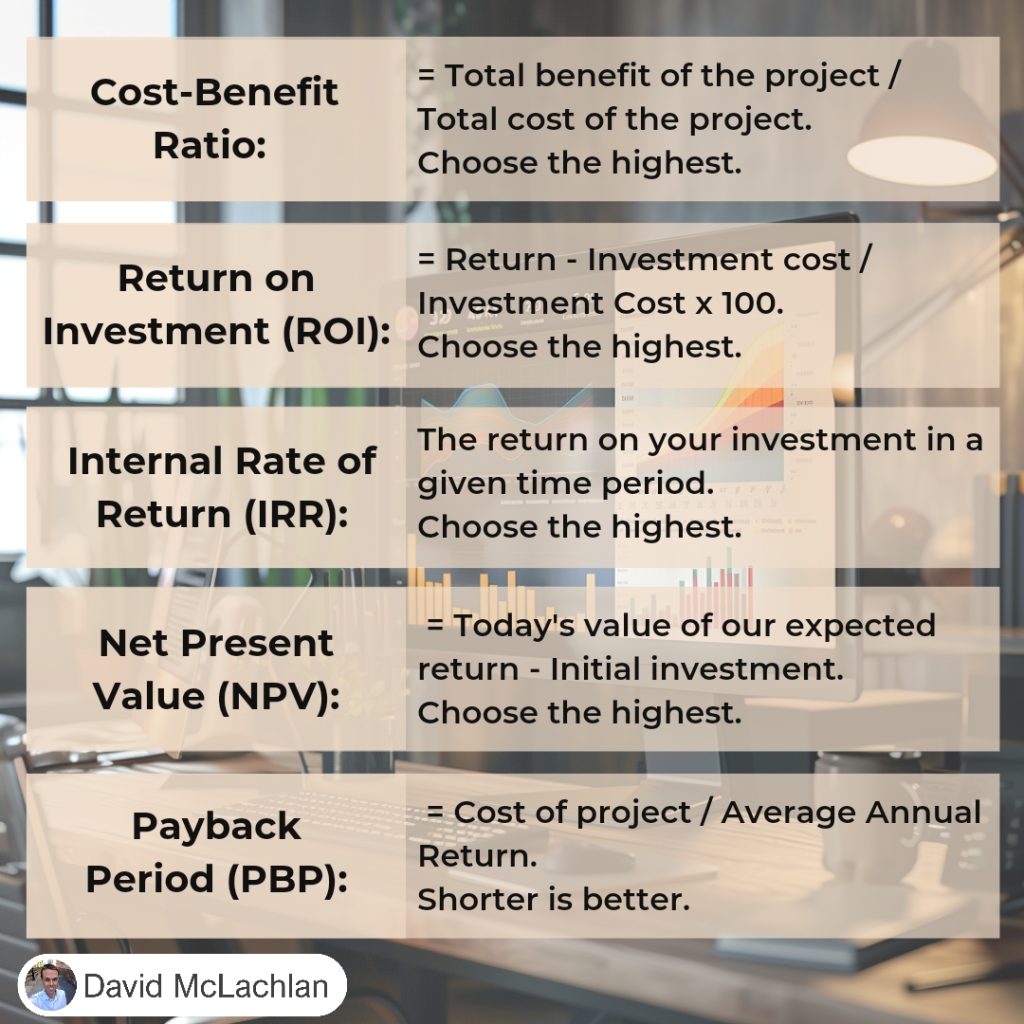
There are many ways to measure the business value you deliver as part of your project. Some of these ways are tangible (money, shareholder value, market share) and some are intangible (Brand recognition, goodwill, strategic alignment etc).

Ultimately the best value comes down to an improvement in some financial measure for your company, and these are measured in the following ways:

Cost-Benefit Ratio:

The cost-benefit ratio = the Total benefit of the project / Total cost of the project.

Choose the highest.

Return on Investment (ROI)

Return on Investment = the Project Return – Project Cost / Project Cost x 100.

Choose the highest.

Internal Rate of Return (IRR)

IRR is the return on your investment in a given time period.

Choose the highest.

Net Present Value (NPV)

Net Present Value = Today’s value of our expected return – Initial investment.

Choose the highest.

Payback Period (PBP):

The Payback period = The Cost of the project / Average Annual Return.

Shorter is better.

See more Project Management Picture Concepts: 

You can see what people are saying about David McLachlan here: REVIEWS

Navigate to Free Project Management and Leadership Articles through the links on the right (or at the bottom if on Mobile) 
PMI PMP 35 PDUs CourseThe Ultimate PMP Project Management Prep Course (35 PDUs)
Agile Certified Practitioner (PMI-ACP 21 PDUs)The Complete Agile Course: PMI-ACP (21 PDUs), Coaching, Jira and MORE! 
50 Project Management Templates Gantt Chart Risk Matrix and more Excel50+ Project Management Templates in Excel and PowerPoint (Gantt Chart, Risk Matrix and more!)
Project Management Plan TemplatesPre-made Project Management PLAN Template: Save 100 HOURS!


Crowdstrike and Quality Management on a Project

Why is Quality important in your project?

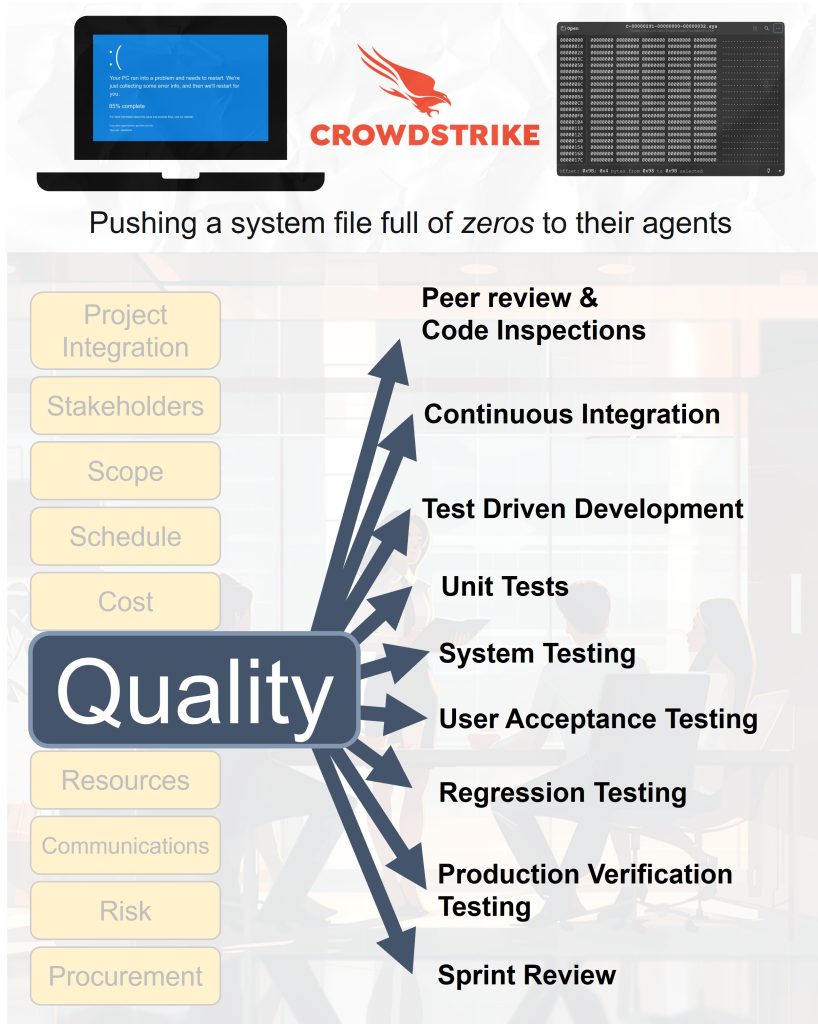
You probably heard about the Crowdstrike outage on the weekend of July 2024 that disrupted airports, banks and stores all around the world. It was caused by Crowdstrike pushing a system file full of zeros to production.

How can we avoid this sort of disaster as we manage our own Projects? There are many ways:

➡️ Peer review & Code Inspections: Checking the requirements with a user or reviewing the code with another Developer.

➡️ Continuous Integration: Merging changes into the main test system (often daily) with automatic tests.

➡️ Test Driven Development: Tests are written first, failed, then run again and passed after the solution is coded.

➡️ Unit Tests: Testing each small piece or User Story.

➡️ System Testing: Testing the integrated system as a whole.

➡️ User Acceptance Testing: Testing the system from the User’s point of view.

➡️ Regression Testing: Testing the existing system with the changes to see if they’ve impacted normal operations.

➡️ Production Verification Testing: Testing the change in the live environment after go-live then rolling the change back if it goes wrong.

➡️ Sprint Review: Demonstrating the actual change to the customer or senior users before release.

Quality is one of the 10 Project Management Knowledge Areas for a reason.

⭐ What are some of the ways you manage Quality on your own projects? ⭐

See more Project Management Picture Concepts: 

You can see what people are saying about David McLachlan here: REVIEWS

Navigate to Free Project Management and Leadership Articles through the links on the right (or at the bottom if on Mobile) 
PMI PMP 35 PDUs CourseThe Ultimate PMP Project Management Prep Course (35 PDUs)
Agile Certified Practitioner (PMI-ACP 21 PDUs)The Complete Agile Course: PMI-ACP (21 PDUs), Coaching, Jira and MORE! 
50 Project Management Templates Gantt Chart Risk Matrix and more Excel50+ Project Management Templates in Excel and PowerPoint (Gantt Chart, Risk Matrix and more!)
Project Management Plan TemplatesPre-made Project Management Plan Template: Save 100 HOURS!


Scrum Roles & Responsibilities

There are Three Main “Roles” in a Scrum Team

Scrum is one of the main frameworks that make up Agile as we know it today – but it is not the only framework.

Agile has also expanded in use outside of development teams, and into general knowledge work, design, research, or anywhere else an iterative and incremental approach to delivering value is needed.

The heart of a Scrum Team is the Team.

The Team

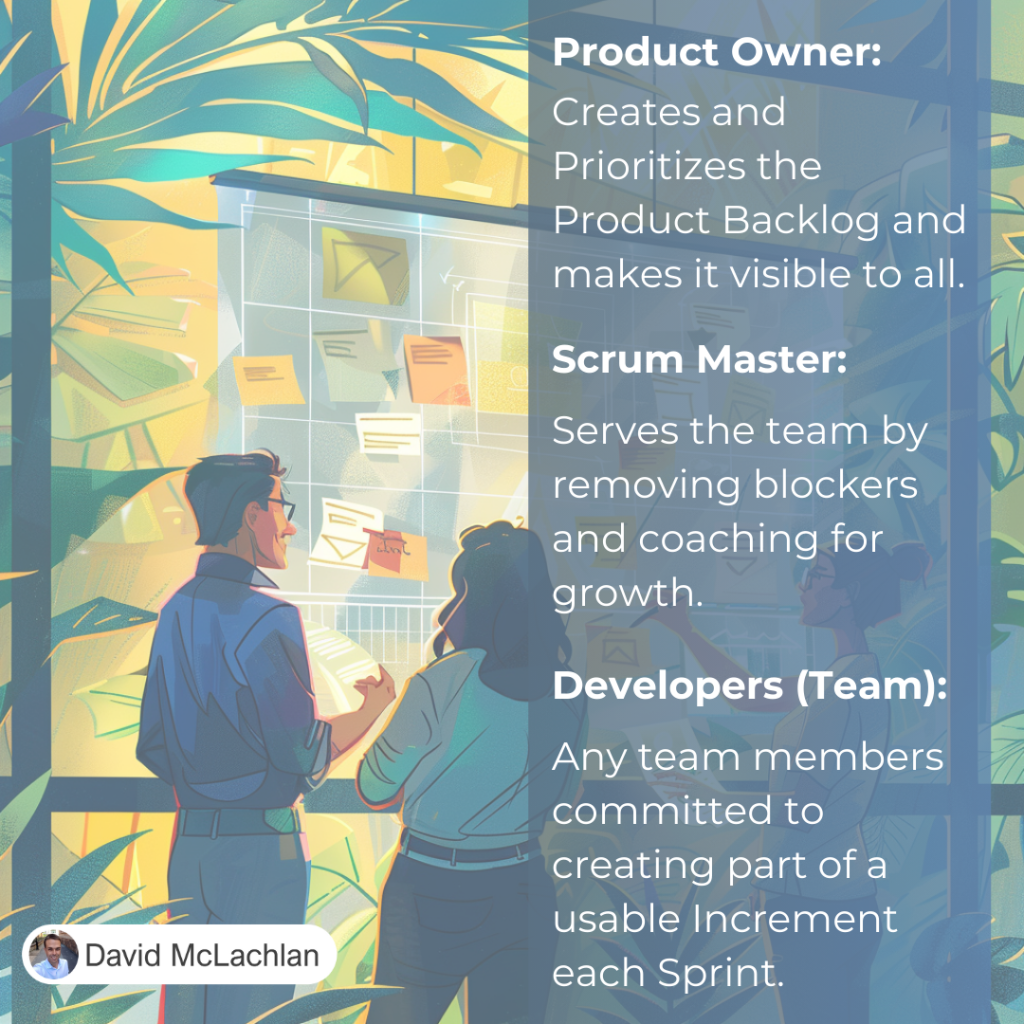
The team are traditionally Developers, but today they can be anyone involved in creating the increment of value that the team are delivering. Team members are often “T-shaped”, where they have a broad range of skills and one deep specialty, like a capital letter “T”.

The Product Owner

The Product Owner is responsible for the value the team delivers. This is called the Product Goal. They do this by creating a backlog of usable, customer-valued features or “increments” that the team can deliver, and prioritizing this from highest value to lowest value (sometimes adjusting for effort also). This is called the Product Backlog.

They ensure the Product Backlog is transparent to all and well understood by anyone who needs it.

The Scrum Master

Is the “Servant Leader” – they serve the team by removing blockers (escalating to their network or helping the team problem solve as a neutral third-party facilitator). They also facilitate many of the team ceremonies such as the Daily Stand-up, Sprint Planning and Retrospectives – but they don’t have to if the team is mature enough to do this on their own. They focus on the team’s growth, looking for ways to help them improve in their chosen field (e.g. development, analysis, business value etc.) and in their Agile way of work.

See more Project Management Picture Concepts:

You can see what people are saying about David McLachlan here: REVIEWS

Navigate to Free Project Management and Leadership Articles through the links on the right (or at the bottom if on Mobile) 
PMI PMP 35 PDUs CourseThe Ultimate PMP Project Management Prep Course (35 PDUs)
Agile Certified Practitioner (PMI-ACP 21 PDUs)The Complete Agile Course: PMI-ACP (21 PDUs), Coaching, Jira and MORE! 
50 Project Management Templates Gantt Chart Risk Matrix and more Excel50+ Project Management Templates in Excel and PowerPoint (Gantt Chart, Risk Matrix and more!)
Project Management Plan TemplatesPre-made Project Management PLAN Template: Save 100 HOURS!


The Change Control Process in Project Management

Change Happens When Delivering a Project

There are many competing factors when delivering change with a Project. Not only do you have many competing stakeholders with their different needs, biases, history in the organization and more, but you have competing constraints too.

The triple constraint of Scope, Schedule and Cost is impacted frequently on a project. If scope changes a little, it might impact how long it takes to deliver it. And that might cost more. Balancing these is an essential part of being a good Project Manager.

Use Change Requests to Keep Change under Control

If you’re studying or working in Project Management this year, know the broad Change Control process.

So, so many project managers never even outline their Change Control approach – or worse – they confuse it with modern Organizational Change Management (transitioning a product to operations or BAU).

The good part is, you get to decide (with your stakeholders) your project’s Change Control approach and you outline this in your Change Management Plan.

YES this works for Agile too, but it’s usually just a single line as the Product Owner decides on Scope Changes with the Product Backlog, and they understand and absorb the impact to their Schedule (Cost is often fixed).

Make sure you know it. Make sure you write it down.

Then deliver value and win. The typical Change approach might be:

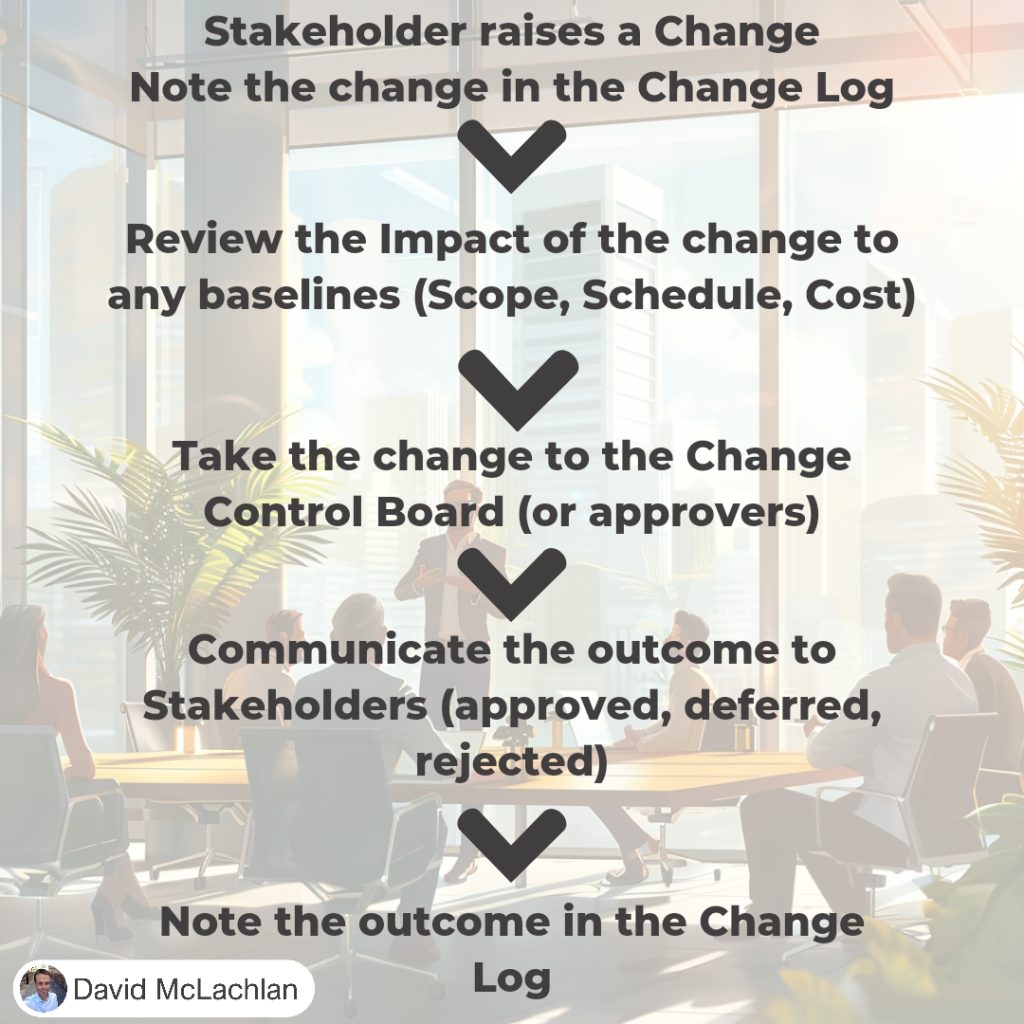
  1. A Stakeholder raises a change to the Scope, Schedule, Cost, Resources (or any other baselined part of the project).
  2. We note that proposed change in the Change Log.
  3. We analyze the impact of the change to our project Cost, Schedule, Scope, and any other necessary impact.
  4. We take this information to the Change Control Board, or the approver. This might be multiple people or just one person (i.e. a Project Sponsor or Product Owner).
  5. We communicate the outcome of the change to the necessary stakeholders (Approved, Deferred, Rejected).
  6. We update the Change Log with the outcome and take the necessary change action.

See more Project Management Picture Concepts:

You can see what people are saying about David McLachlan here: REVIEWS

Navigate to Free Project Management and Leadership Articles through the links on the right (or at the bottom if on Mobile) 
PMI PMP 35 PDUs CourseThe Ultimate PMP Project Management Prep Course (35 PDUs)
Agile Certified Practitioner (PMI-ACP 21 PDUs)The Complete Agile Course: PMI-ACP (21 PDUs), Coaching, Jira and MORE! 
50 Project Management Templates Gantt Chart Risk Matrix and more Excel50+ Project Management Templates in Excel and PowerPoint (Gantt Chart, Risk Matrix and more!)
Project Management Plan TemplatesPre-made Project Management PLAN Template: Save 100 HOURS!